The Document Delivery Ribbon
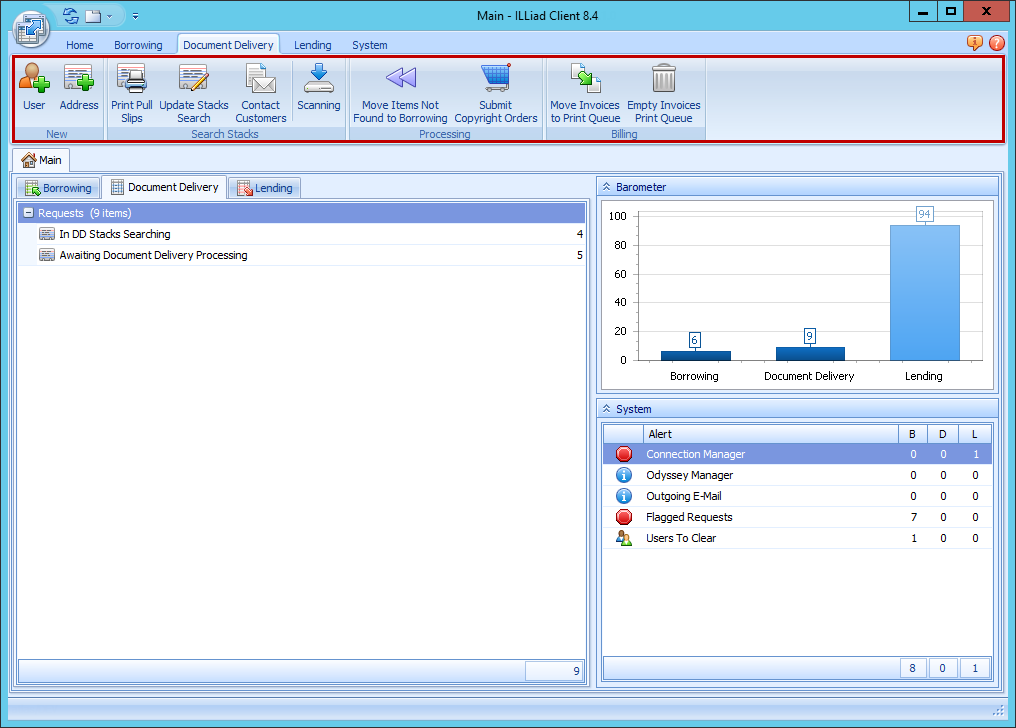
The Document Delivery Ribbon holds icons for all of the main Doc Del processing functions so that you can reach them quickly and easily from the Main page.
- Create users
- Print pull slips
- Update Items
- Contact customers
- Scan articles
- Submit copyright orders
| Button | Description |
|---|---|
| User | Opens the New User form to add a new user. Saving the New User form automatically opens the User Form for the new User. |
| Address | Opens the New Lender Address form to add a new Lender address. Saving the New Lender Address form automatically opens the Lender Address form for the new Lender. |
| Print Pull Slips | Moves items in the Awaiting Document Delivery Stacks Searching queue to the print queue. The ILLiad client proceeds with the print process according to your Print Configurations. |
| Update Stacks Search | Opens the Update Stacks Search form so you can mark items as Found, cancel or conditionalize, etc. |
| Contact Customers | Opens the Customer Contact Form. |
| Scanning | Opens the Scanning form. |
| Move Items Not Found to Borrowing | Moves items in the Doc Del Not Found queue (those items marked as Not Found) to Borrowing. |
| Submit Copyright Orders | Opens the Copyright Orders form. |
| Move Invoices to Print Queue | Moves Billing invoices to the Doc Del Billing print queue. The ILLiad client proceeds with the print process according to your Print Configurations. |
| Empty Invoices Print Queue | Clears the Doc Del Billing print queue. |
For more information on print configurations, see Print Configurations.