Cancelling Document Delivery Requests
If at any point you determine that you are unable to supply the requested item for any reason, you may cancel the request.
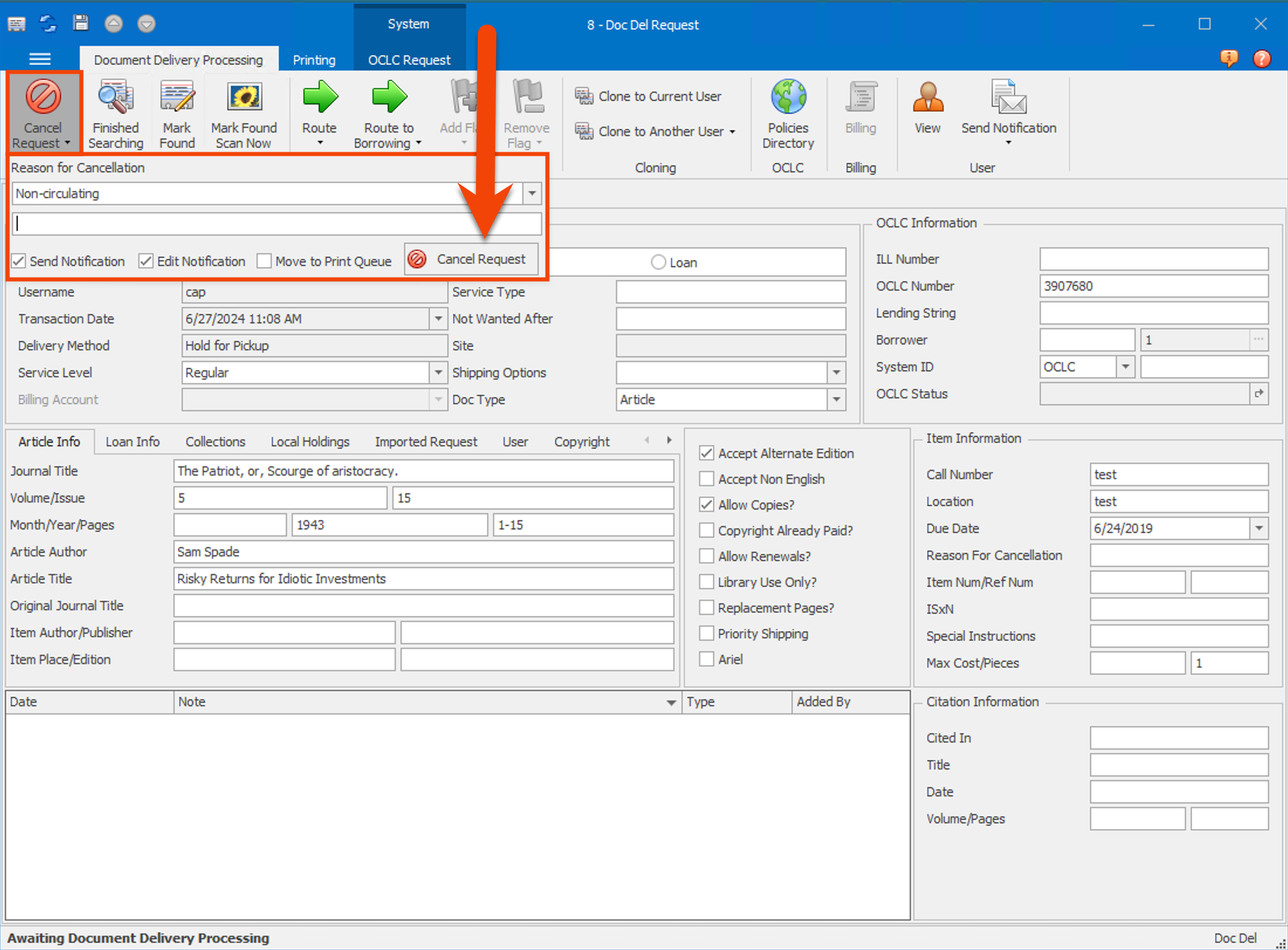
- On the Document Delivery request form, click Cancel Request. The Reason for Cancellation box will appear.
- Select a Reason for Cancellation from the dropdown menu.
- Add any additional information you want to include in the notes field below the reason dropdown field. This note will be saved to the request in the Notes grid.
- If you want to send a notification email to the patron, check the Send Notification checkbox.
- If you want to edit the email before sending it, check the Edit Notification checkbox.
- If you want to print a cancellation notice, check the Move to Print Queue checkbox.
- Click Cancel Request. The transaction status will change to Cancelled by ILL Staff.
Reasons for Cancellation
The selected Reason for Cancellation and an accompanying note will be saved in ILLiad and will be included as a note in the request. See Document Delivery Reasons for Cancellation for more information.