Configuring Cancellation Reasons
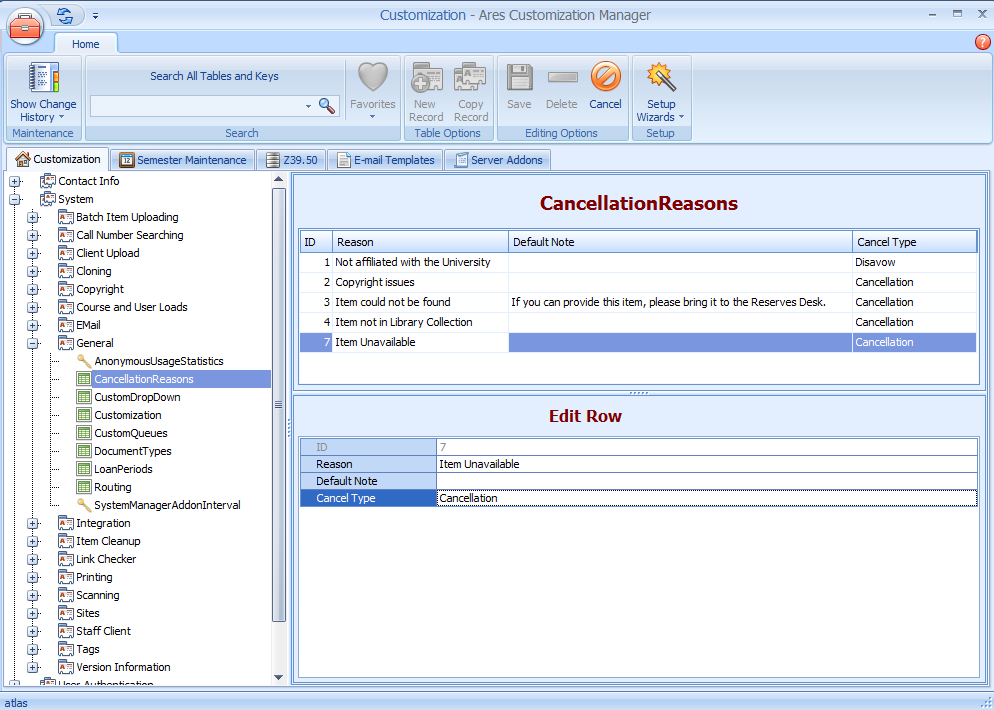
Cancellation reasons are configured in the CancellationReasons table in the System | General section of the Ares Customization Manager. Several default cancellation reasons are included in the CancellationReasons table. You can add new records and edit and delete records.
Adding Cancellation Reasons
- Open the CancellationReasons table in the Ares Customization Manager.
- Click the New Record button.
- Complete the fields below with the required values:
| Field | Description |
|---|---|
| ID | This defaults to the next numerical value available (1, 2, 3, etc). |
| Reason | The reason that the item request is being canceled. This will display in the Cancellation email. |
| DefaultNote | A standard note that will appear in the Item Notes field of the Item Information form for the given reason. |
| CancelType | Cancel or Disavow are the possible cancel types. |
- Click the Save button.
Editing Records
Editing allows you to change all values in the records except the auto-generated ID. This number will not change.
- Open the CancellationReasons table in the Ares Customization Manager.
- Double-click the entry you wish to edit to open the edit box.
- Make your changes to the entry and click the Save button.
Copying Records
You can create new records by copying existing records and changing the values in the edit box. Copying records creates a new record by auto-generating a new ID value.
- Open the CancellationReasons table in the Ares Customization Manager.
- Select the record you want to copy and click the Copy Record button.
- Make your changes to the entry and click the Save button.
Deleting Records
Delete the cancellation reason from the client and the database using the Delete button.
- Open the CancellationReasons table in the Ares Customization Manager.
- Select the record you want to delete and click the Delete button.
- Click Yes to delete the record. This action cannot be undone.
- The record is removed from the CancellationReasons table.