Resetting a Staff Member's Authenticator
Every Aeon account that signs in with a password also needs a code from an authenticator app, so a lost or replaced phone stops someone working. Reset MFA is the fix: it clears the enrollment so the person sets up a fresh authenticator the next time they sign in.
You'll reach for this more often than you'd expect — new phones, wiped phones, and staff who worked through all ten of their recovery codes all end up here.
- Someone has lost the device their authenticator was on, or replaced it without migrating the app.
- Someone has run out of recovery codes — a reset is the only way to issue more.
- You're switching phones yourself and want to move your own authenticator across.
An account showing the Atlas Support badge authenticates through Atlas Systems' own service, so no authenticator is ever enrolled here. Reset MFA is refused on these accounts, as is a password reset. See Support Access.
Resetting someone's credentials is effectively a takeover: whoever runs the reset chooses the new password, and the account's next sign-in enrolls a fresh authenticator. So Aeon refuses a reset that would hand you access you don't already have.
Two checks apply, and both compare the target's access with yours:
- Configuration access. If the account holds a configuration group you don't, the reset is refused: "Resetting this account's credentials would let you sign in with configuration access you do not have yourself… Ask someone who holds that access to run the reset." So an editor holding only Staff can't reset a colleague who also holds Integrations — that group governs the single sign-on trust configuration.
- Site reach. If the account can reach sites you can't, it's refused the same way: "Resetting this account's credentials would let you sign in to site(s) you do not have yourself…"
This stays quiet in normal use, because it turns on access rather than seniority. Administrators hold every configuration group, so nothing changes for them, and the staff a help desk resets for usually hold none at all. Resetting a peer whose access you already have is still fine.
Resetting an authenticator requires the Staff configuration capability — the same access that lets you manage staff accounts at all. It's the same gate whether you're resetting your own or someone else's.
Resetting someone else's
- Go to Customization Manager → Roles & Permissions → Staff and select the account.
- Click Reset MFA.
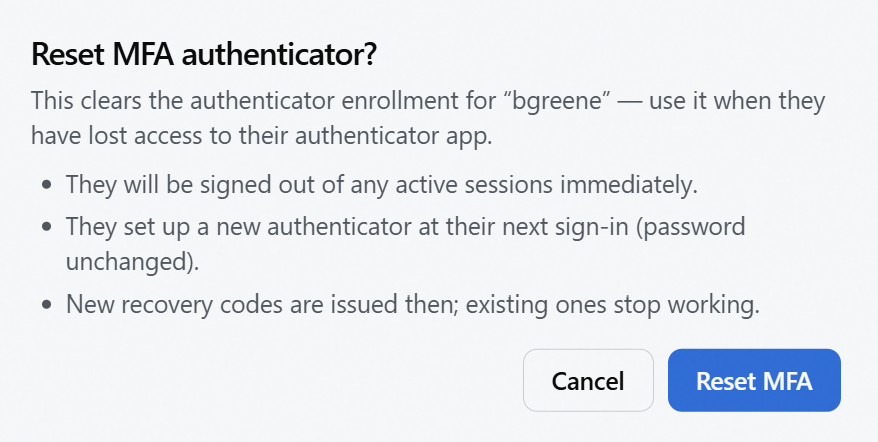
- Read the confirmation and click Reset MFA to go ahead.
The button only does something when there's an authenticator to clear, so it's switched off when the Authenticator line on the Sign-in card reads "Not enrolled. One is set up the next time they sign in." Nothing is wrong — that account is already in the state a reset would produce, and the person will be walked through setup at their next sign-in.
It's also switched off on your own account when you sign in through your institution, because there's no password for you to confirm — that path asks for your current Aeon password, and an SSO account doesn't sign in with one. An administrator resets it for you in that case.
Aeon confirms with "Authenticator reset for "[username]". They have been signed out and will set up a new authenticator at next sign-in."
What actually happens to them:
- They're signed out of every active session immediately. If they're mid-task, that work is lost — worth a heads-up first if they're at their desk.
- They set up a new authenticator at their next sign-in. Aeon shows them a fresh QR code, exactly as it did on their first ever sign-in.
- Their password is unchanged. This is not a password reset; they sign in with the same password they already had.
- They get a new set of recovery codes, shown once, at that next sign-in. Their old codes stop working.
There's no self-service way for staff to generate more recovery codes. If someone has spent all ten, a reset is the route — it issues a fresh set as part of setting up the new authenticator.
Resetting your own
The same Reset MFA control works on your own account, which is the sensible way to handle your own new phone. It behaves differently in two ways.
You have to confirm your current password. The dialog adds a Confirm your current password to continue field, and the confirm button stays unavailable until you fill it. That's deliberate — clearing your own second factor is exactly the action someone who'd walked up to your unlocked screen would want, so Aeon asks you to prove it's you. A wrong password is reported in the dialog ("Current password is incorrect.") and the dialog stays open so you can correct it.
You're signed out immediately, including the tab you're working in. The dialog warns you: "You will be signed out immediately, including this tab — save any edits first." Take that literally — save your work before you click.
Afterwards, Aeon says "Your authenticator was reset. Sign in again to set up a new one." You sign in with your password as usual, scan a fresh QR code, and get new recovery codes.
If you're the only person with the Staff capability and something goes wrong between the reset and setting up your new authenticator, nobody can reset you again. Where you can, have a second person with that access before you reset your own — or use a recovery code to get in on the new device instead, if you still have one.
Accounts that sign in through single sign-on
An account in SSO mode signs in at the identity provider, so there's no Aeon password for it to confirm — which means it can't self-reset. An administrator resets it instead, using the flow above.
Whether such an account needs an authenticator at all depends on a setting: see Moving Staff Accounts to Single Sign-On.
Related tasks
- Resetting a Staff Member's Password — a separate action; neither reset affects the other.
- Signing In with an Authenticator App — what the staff member sees, and what to tell them to expect.