Single Sign-On Settings Reference
Every control on Customization Manager → Integrations & Messaging → Single Sign-On, in the order you meet it. The setup walkthroughs say which settings matter and in what order; this page says what each one does. Which cards you see depends on the protocol: some are SAML-only, and the identity-provider card is different for OpenID Connect.
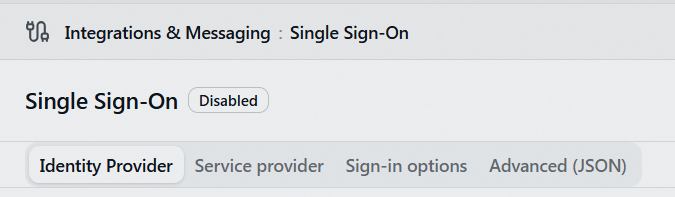
The page and its API require the Integrations configuration capability, and API keys are refused outright. Every save, certificate change, emergency-access confirmation, and restart request is recorded in the staff web auth audit log, a database table with no viewer inside Aeon; Testing and Troubleshooting Single Sign-On explains how to get at it.
The page header
| Control | What it does |
|---|---|
| Enabled / Disabled badge | Reflects the saved state, not the form. |
| Test sign-in | Runs the full round trip in a new tab against the saved configuration, using whichever protocol is saved, and reports the result without creating a session. |
| Discard | Reverts the active tab's unsaved edits. |
| Save | Saves the configuration. Grayed out when nothing has changed, or when the Advanced (JSON) tab has unsaved edits. |
The form tabs and the Advanced (JSON) tab edit the same configuration by different routes, so Aeon won't hold unsaved changes in both: unsaved edits on Advanced (JSON) disable Save, and unsaved edits on a form tab disable Save document. Nothing on screen says which case you're in, so if Save looks stuck, check the Advanced tab. Discard clears the active tab and gets you moving again.
With single sign-on off, the page saves incomplete drafts. Saving with it on triggers full validation and the emergency-access confirmation.
Tab: Identity Provider
Enable single sign-on
| Setting | Default |
|---|---|
| Single sign-on enabled | Off |
"When on, staff can sign in through your identity provider. When off, only password sign-in is available and the SSO endpoints do nothing." Turning it on triggers full validation and the emergency-access confirmation. Turning it off takes effect immediately and changes nobody's account mode, so switching back on restores every converted account's sign-in as it was.
While single sign-on is off, nobody whose account is in SSO mode can sign in. Aeon decides on the account's mode before it checks a password, so an SSO-mode account gets the ordinary "Invalid username or password" with nothing to explain why, and its old stored password isn't consulted. Local accounts keep working, which is what your emergency administrators are for. Getting a converted person in during an outage means converting their account back to Local, not turning the switch off while you investigate.
Protocol
| Option | On screen | Default |
|---|---|---|
| SAML 2.0 | "Signed assertions, SP metadata, and optional InCommon federation." | Yes |
| OpenID Connect | "Authorization-code flow with PKCE; endpoints discovered from the authority." |
The SAML service-provider private key and the OIDC client secret share one encrypted slot, so saving a protocol change clears whichever was held. Re-establishing that side means a new SP certificate and a metadata re-import for SAML, or a new client secret for OIDC. The trigger is the save: selecting the other protocol to read its fields costs nothing, and Discard restores the form. The signing-certificate list survives a protocol change.
Identity provider — SAML
Two mutually exclusive sources; only the selected one is saved.
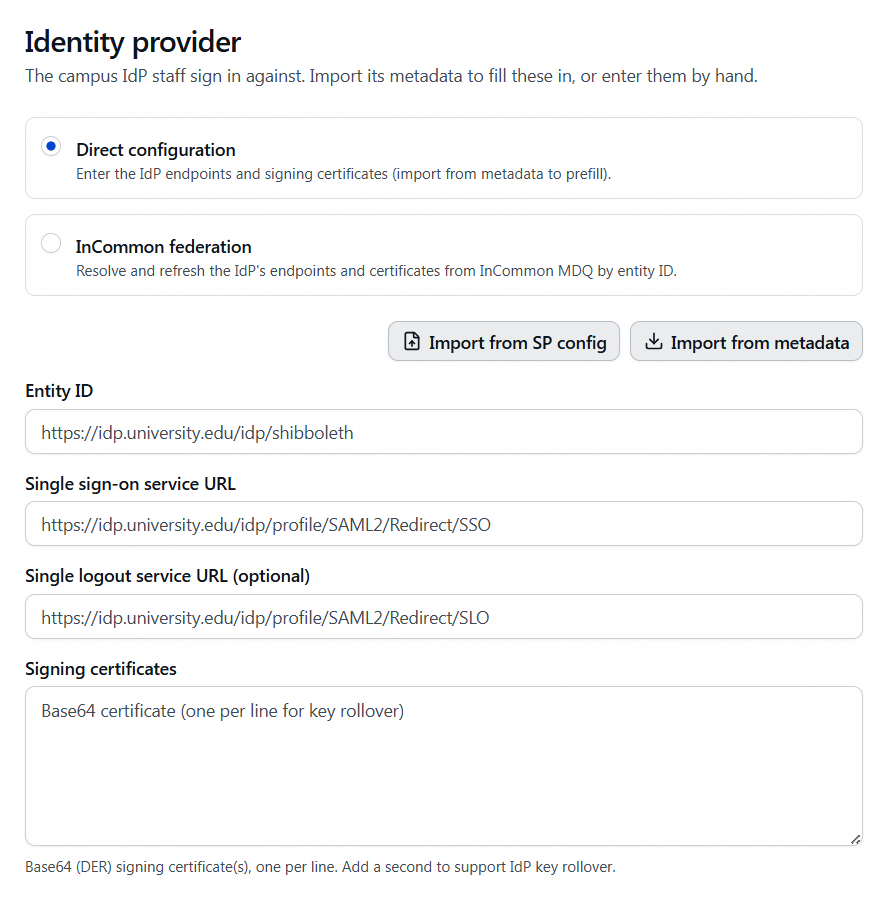
Direct configuration
| Field | Notes |
|---|---|
| Entity ID | The IdP's entityID, e.g. https://idp.university.edu/idp/shibboleth |
| Single sign-on service URL | The IdP's SAML2 Redirect SSO endpoint |
| Single logout service URL (optional) | Leave blank to keep sign-out local to Aeon |
| Signing certificates | The encoded certificate text, one certificate per line. Paste just the text between the -----BEGIN CERTIFICATE----- and -----END CERTIFICATE----- lines; line breaks inside it are stripped for you, but the BEGIN and END lines are not. Add a second certificate to support IdP key rollover. |
Two buttons prefill this card. Both fill the form for review and persist nothing until you save.
- Import from metadata — reads the IdP's metadata from a URL or pasted XML. URL fetches run server-side, are HTTPS-only, are guarded against server-side request forgery, and don't follow redirects.
- Import from SP config — reads a legacy
SAML.config(Atlas SAML module) orshibboleth2.xml(Shibboleth SP), format detected automatically. Anything that couldn't be carried across is reported in an amber banner. Private keys never transfer, and a Shibboleth config carries only the IdP metadata URL, so run Import from metadata afterwards.
InCommon federation
| Field | Notes |
|---|---|
| IdP entity ID | Your IdP's entityID within the federation |
| MDQ base URL (optional) | "Leave blank to use the InCommon default MDQ service." |
| Federation signing certificate | "Pinned metadata-signing certificate — every fetched document is verified against it." |
Endpoints and certificates resolve on demand and refresh on a schedule; a failed refresh keeps the last good copy. IdP key rollovers and endpoint moves are picked up without your editing anything.
Identity provider — OpenID Connect
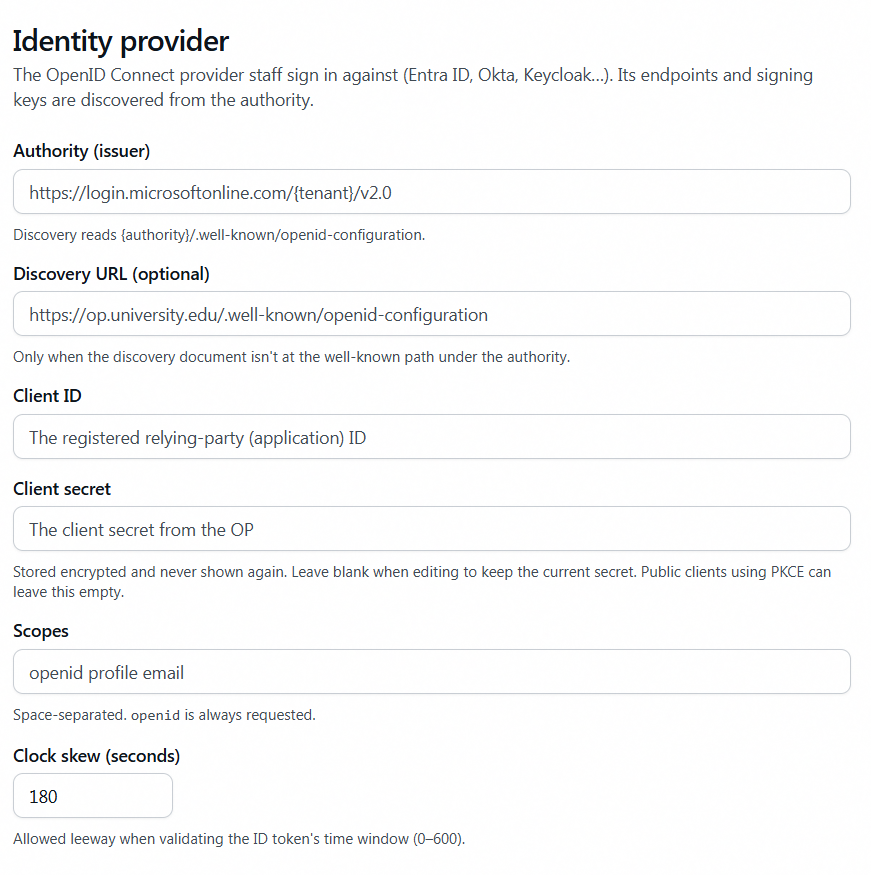
| Field | Notes | Default |
|---|---|---|
| Authority (issuer) | The issuer URL exactly as the provider publishes it, with no path added. Must be HTTPS to enable. Aeon appends /.well-known/openid-configuration itself, and strips that path if you paste it, both when you leave the field and on save. | — |
| Discovery URL (optional) | "Only when the discovery document isn't at the well-known path under the authority." | blank |
| Client ID | The registered relying-party (application) ID. | — |
| Client secret | "Stored encrypted and never shown again. Leave blank when editing to keep the current secret. Public clients using PKCE can leave this empty." Once stored, the field shows a masked placeholder. | — |
| Scopes | Space-separated. openid is always requested whether listed or not. | openid profile email |
| Clock skew (seconds) | Leeway when validating the ID token's time window. Range 0–600. | 180 |
Tab: Service provider
With SAML 2.0 selected this tab reads Service provider and carries everything below. Under OpenID Connect it is relabelled Override public URLs and keeps only that card, because the service-provider details are SAML concepts.
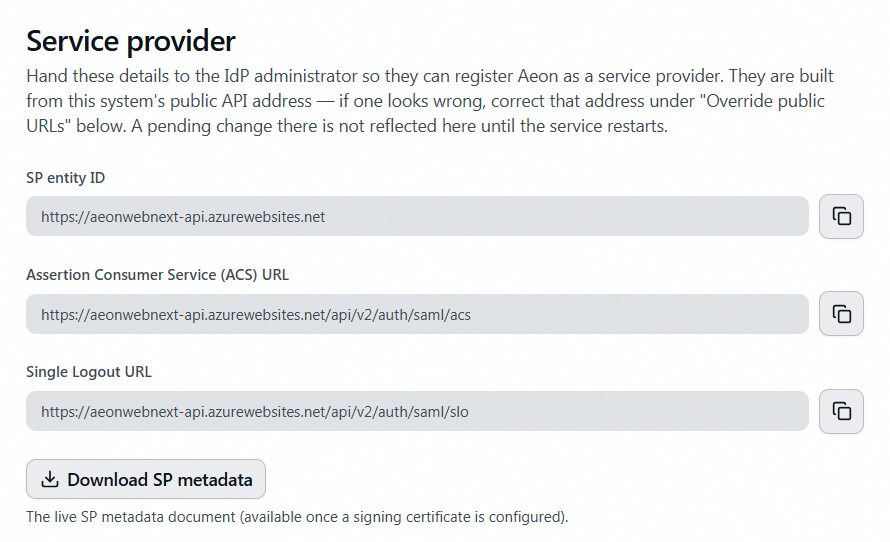
Three read-only copy fields plus a download, all built from the public API address. A pending change to that address isn't reflected here until the service restarts.
| Value | Built from |
|---|---|
| SP entity ID | The API base URL. An entityID is an identifier rather than an address, so a URN-style value is fine if your IdP team prefers one; set spEntityId on the Advanced (JSON) tab, or let Import from SP config carry an existing one across. Aeon trims a trailing slash rather than let one change the value your provider already trusts. |
| Assertion Consumer Service (ACS) URL | The API base URL plus /api/v2/auth/saml/acs |
| Single Logout URL | The API base URL plus /api/v2/auth/saml/slo |
| Download SP metadata | The live metadata document, generated from the current configuration, so it always includes every valid certificate. It serves only while single sign-on is enabled; with SSO off, the endpoint answers SSO_NOT_CONFIGURED even with a valid certificate in place, whatever the "available once a signing certificate is configured" help text implies. |
Signing certificates
A Configured / Not configured badge, then one row per certificate: its name (the subject CN, or the thumbprint if there isn't one), validity dates, thumbprint, and Signing, Expired, or Not yet valid badges.
| Control | What it does |
|---|---|
| Generate certificate / Add certificate | Creates a self-signed certificate valid 5 years and appends it. |
| Upload .pfx | Imports a PKCS#12 file (.pfx / .p12). You're prompted for the PFX password (if any); the key is re-exported without a password and encrypted at rest, and the password isn't kept. |
| Delete (trash icon, per row) | Removes that certificate. Refused for the last currently-valid certificate while SAML SSO is enabled. |
Rotation and its guards: Managing Service Provider Certificates.
Override public URLs
Aeon resolves its two public base URLs from three layers, highest priority first:
| Layer | Where it comes from |
|---|---|
| Override | This card |
| Deployment configuration | PublicUrls:ApiBaseUrl and PublicUrls:FrontendBaseUrl (as environment variables, PublicUrls__ApiBaseUrl and PublicUrls__FrontendBaseUrl). On a hosted deployment they're applied on every deploy; on a Windows on-premises install the installer stamps both. |
| Built-in defaults | http://localhost:5002 and http://localhost:3000 — correct for local development, wrong everywhere else |
The card's own text: "You shouldn't need to touch this. The addresses single sign-on uses are worked out during installation and shown in gray below — enter a value only to override one that's wrong, which usually means a custom DNS name or a reverse proxy the server can't see."
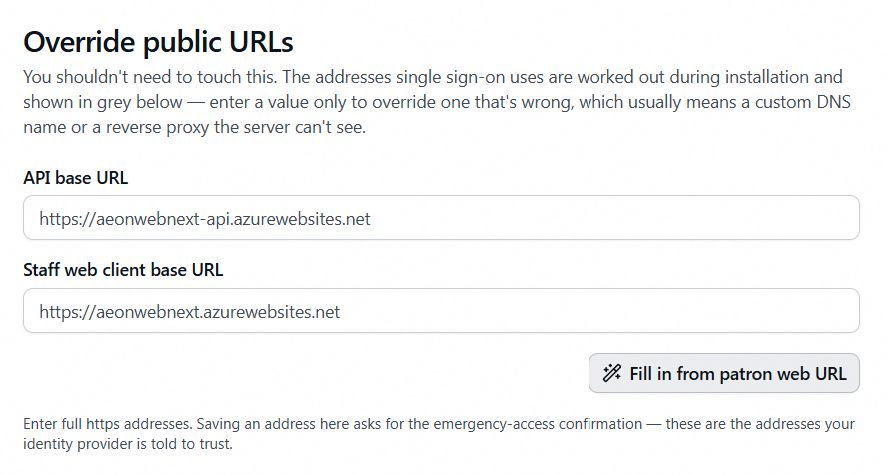
| Control | Notes |
|---|---|
| API base URL | Blank means "use the server's configured value," which the gray placeholder shows. |
| Staff web client base URL | Same convention. A wrong value here shows up as a blank page after an otherwise successful SSO sign-in, and as invitation emails carrying the wrong address. |
| Fill in from patron web URL | Derives both from the patron-web WebURL key: its host, forced to HTTPS, plus the standard /StaffAPI and /Staff paths — the installer's own derivation. Prefill only. |
| Restart now | Appears, with a pending-restart notice, only once a saved address differs from the one Aeon is running with. It really does restart the staff API. |
Enter full HTTPS addresses. Saving an address here asks for the emergency-access confirmation, because these are the addresses your identity provider is told to trust.
Aeon resolves its public URLs once at startup, because the sign-on endpoints can only be registered then. Until you click Restart now, the Service provider details and the metadata your identity provider reads still describe the previous addresses. The restart is graceful: nobody is signed out, requests in progress finish, and the process comes back on the next request after a brief cold start. Anything held only in memory — an authenticator enrollment or an SSO sign-in part-way through — has to be started again. The restart is audited, requires the Integrations capability, and can't be triggered by an API key. Pick a quiet moment.
Under OpenID Connect with single sign-on still off, the notice is suppressed (nothing on the page is built from those addresses until SSO is enabled); under SAML it always shows.
Tab: Sign-in options
Login page & identity matching
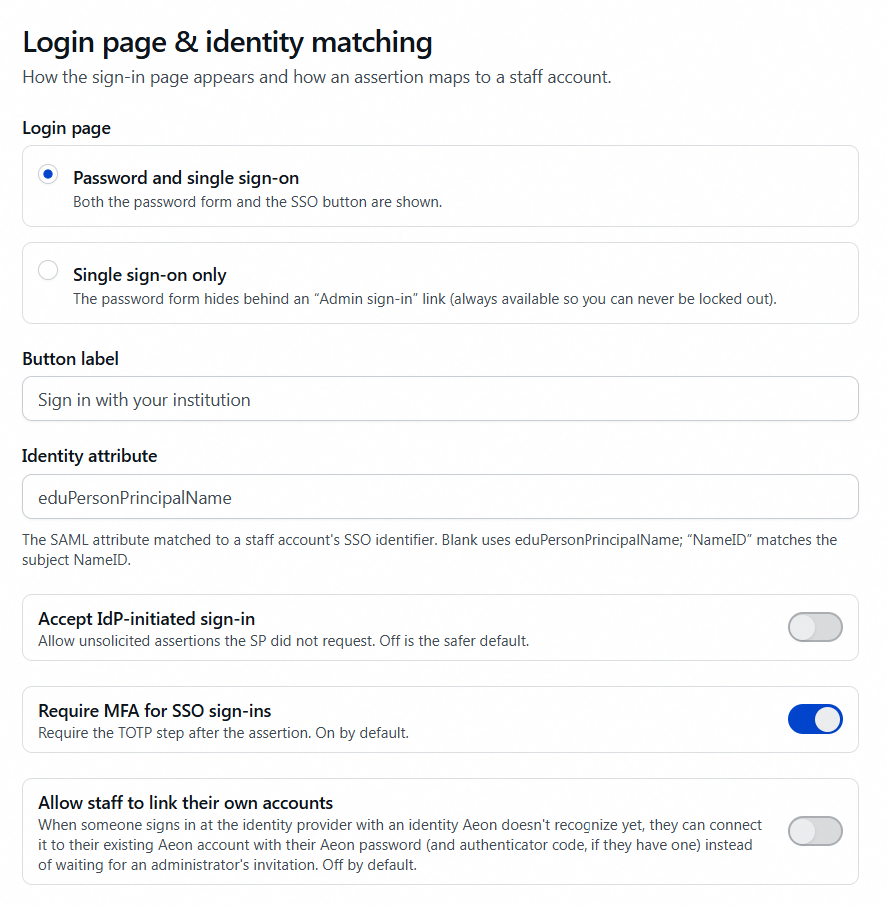
| Setting | Behavior | Default |
|---|---|---|
| Login page | Password and single sign-on shows both the password form and the SSO button. Single sign-on only hides the password form behind an Admin sign-in link that is always available. Presentation only; the password endpoint keeps working either way. | Password and single sign-on |
| Button label | The SSO button's text. Blank falls back to "Sign in with your institution." Max 100 characters. | blank |
| Identity attribute | The SAML attribute (or OIDC claim) matched to a staff account's SSO identifier. Blank uses eduPersonPrincipalName, by friendly name or OID; NameID matches the subject NameID. Max 255 characters. | blank |
| Accept IdP-initiated sign-in | "Allow unsolicited assertions the SP did not request. Off is the safer default." With it on, staff can launch Aeon from a campus portal; self-service linking is never offered on that path. | Off |
| Require MFA for SSO sign-ins | "Require the TOTP step after the assertion. On by default." The assertion is the first factor, Aeon's authenticator code the second. SSO users enroll one on first sign-in. | On |
| Allow staff to link their own accounts | Someone who authenticates as an identity Aeon doesn't recognize may connect it to their existing account with their Aeon password (and authenticator code, if enrolled) instead of waiting for an invitation. | Off |
Protocol options
Everything in this card is a SAML concept. Under OpenID Connect, the one timing setting that applies is Clock skew (seconds) on the provider card above.
| Setting | Behavior | Default |
|---|---|---|
| Sign AuthnRequests | "Sign outbound sign-in requests with the SP credential." Needs an SP certificate. | On |
| Require signed assertion | "Require the assertion itself to be signed, not just the response envelope." | On |
| Expect encrypted assertions | "The IdP encrypts assertions to the SP certificate." Turn on to match your IdP's policy. | Off |
| Clock skew (seconds) | Leeway on assertion time windows. Range 0–600. | 180 |
| NameID format (optional) | The requested NameID format, e.g. persistent. Only matters if you match on NameID, and then it must be a stable format, never transient. | blank |
Single sign-on can't be enabled with Require signed assertion and Expect encrypted assertions both off, because an assertion that is neither signed nor encrypted could be forged. The save fails with Enable "Require signed assertion" (or assertion encryption) before turning on SAML — an unsigned, unencrypted assertion could be forged to sign in as any user. If more than one thing is wrong, only the first message is shown; fix it and save again.
Tab: Advanced (JSON)
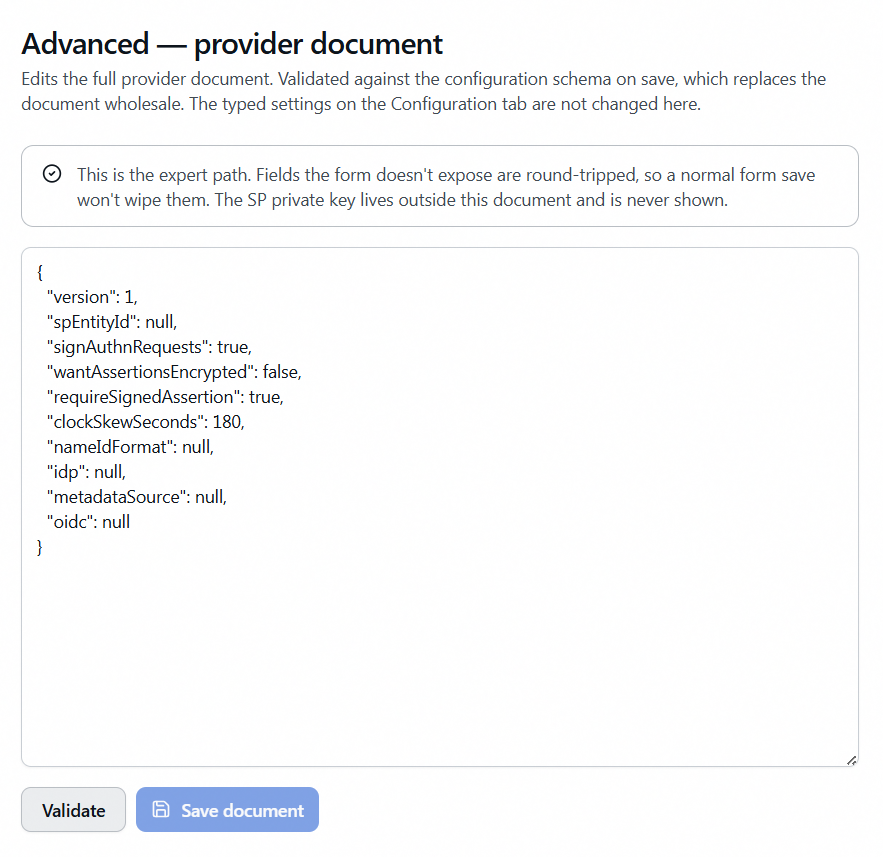
A raw editor for the provider document: the JSON holding your identity-provider details and the SAML protocol settings, the same configuration the form tabs edit. Two legitimate uses: setting an explicit spEntityId (no form control edits it), and a field with no form control, such as an SSO service binding override. The SP private key is never part of this document.
| Control | What it does |
|---|---|
| Validate | Checks that the text is well-formed JSON, nothing more. |
| Save document | Validates against the schema and replaces the document wholesale. Disabled while any form tab has unsaved edits. |
What saving a document does:
- Rebuilds the form tabs from what you pasted; the Identity Provider fields and Protocol options card follow it.
- Replaces rather than merges. Whatever your JSON leaves out goes back to its default, so edit the document already in the box rather than pasting a fragment.
- Can change the protocol. An
oidcblock means OpenID Connect, anything else means SAML, so saving an OIDC document switches the page to OpenID Connect and, as with any protocol change, clears the stored credential. - Always validates in full, even while single sign-on is off. If SSO is on, the document has to clear the same bar as enabling would.
- Leaves the typed settings alone: the Enabled switch, login-page mode, button label, identity attribute, the three sign-in toggles, and the public-URL overrides are stored separately.
- Tidies two things: a pasted
clientSecretis removed (secrets live only in Aeon's encrypted store), and certificate values have their line breaks stripped.